portfolio

Custom Discord bots we have built

Bots set up for real communities: a shop server, a Minecraft server and two game communities. Each one starts from our tested bot system, is set up with that server’s own name, colors and features, and passes its automated tests before delivery.
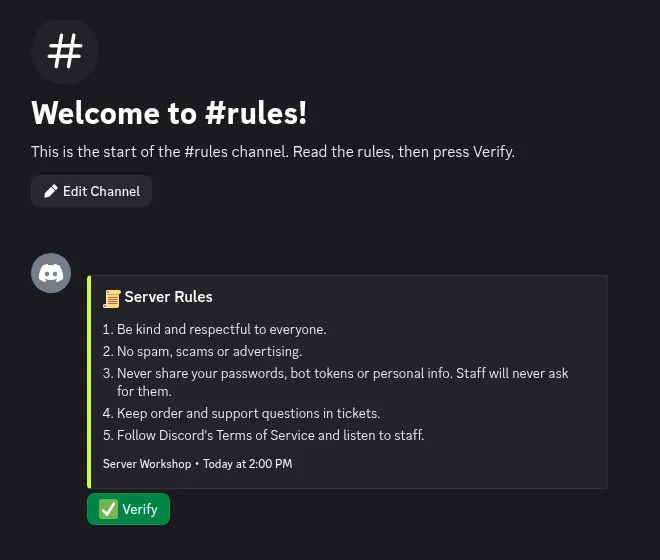
The #rules channel with a Server Rules message and a green Verify button.
Real screenshot Rules and Verify A rules panel with a Verify button, from a Server Workshop bot. RulesVerify
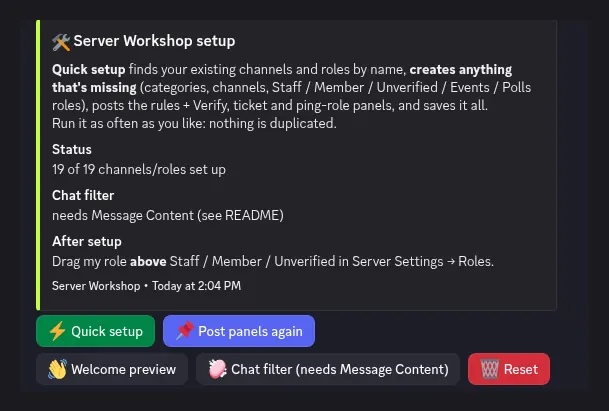
The Server Workshop setup menu in Discord, with Quick setup, Post panels again, Welcome preview, Chat filter and Reset buttons.
Real screenshot The /setup menu Quick setup and buttons to post the panels again. SetupChannelsRoles
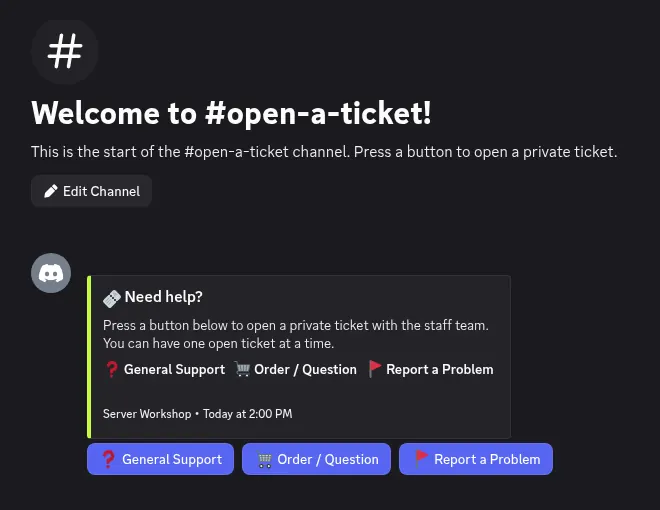
The #open-a-ticket channel with General Support, Order / Question and Report a Problem buttons.
Real screenshot Ticket panel Members press a button to open a private ticket. TicketsSupport

What we build

One bot, built around your server.

Every bot is written in Python, named and colored for your community, and only includes the features you ask for. These are features from bots we’ve already shipped.

Full server setup

One command builds categories, channels, roles and permissions, then posts the panels. Safe to run again.

Tickets

Button panels open private channels with Claim, Transcript and Close. Transcripts go to a log channel.

Moderation & logs

Warn, mute, timeout, kick, ban, purge, chat lock, slowmode, plus a staff log of joins, leaves and deletes.

Auto-mod

Chat filter for swearing, caps and repeats, and a honeypot channel that catches hacked accounts and spam bots.

Rules, verify & roles

A rules panel with a Verify button that unlocks the server, and buttons for members to pick ping roles.

Welcome & goodbye

Branded join and leave messages, with a preview button so you see exactly what members will see.

Levels & invites

Chat XP with /rank and /levels, level-up roles, and an invite tracker that ignores new alt accounts.

Community tools

Giveaways, polls, suggestions with voting, a question of the day, partner cards and quick-reply commands.

Applications

Apply button opens a form. Answers land in a staff channel with Accept and Deny buttons.

Private staff server

A second Discord for your team with a handbook, ticket copies and logs, with staff roles kept in sync.

Game integrations

Live Minecraft server status, account linking and rank sync, or custom commands that match your game.

Custom branding

Your bot name, colors, channel names, role names and message text, all set for your server.

Tested before delivery

Every bot passes its tests first.

  • 304 automated tests
    Server Workshop bot
  • 123 automated tests
    OasisSMP bot
  • 71 automated tests
    Runway Roulette bot
  • 149 automated tests
    Undergrowth Empire bot
  • Tests run offline,
    no bot token needed

Featured bot 01 · Shop server

Server Workshop bot

The bot that runs the Server Workshop Discord: it builds the server in one click, takes orders through tickets, and lets buyers check where their order is.

  • One-click /setup. Quick setup or Showcase layout finds what exists, creates missing categories, channels and roles, and posts the panels. Never duplicates or deletes.
  • Ticket ordering. The order button opens a short form (server name, colors, features, order number). Staff get Claim, Transcript and Close.
  • Order tracking. /order shows each order as Received, Being worked on or Completed. Staff update it with /order-status, and the buyer gets a DM when it’s done.
  • Welcome, rules & roles. Welcome and goodbye with a preview button, rules with Verify, ping-role buttons, a packages panel.
  • Moderation. 14 staff commands (warn, mute, timeout, kick, ban, purge and more), automatic staff logs, a honeypot trap channel and join statistics.
  • Community. Levels with automatic level roles, giveaways, polls, QOTD, suggestions, partners and quick replies.

304 automated tests, all passing

The Server Workshop setup menu in Discord, with Quick setup, Post panels again, Welcome preview, Chat filter and Reset buttons.
Real screenshot The /setup menu Quick setup finds what exists and creates what is missing. Setup
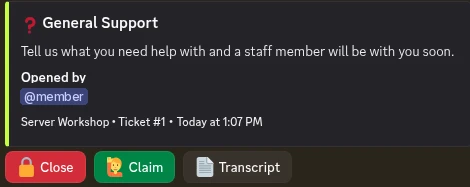
A General Support ticket with Close, Claim and Transcript buttons.
Real screenshot Ticket controls Close, Claim and Transcript buttons inside a ticket. Tickets
Example

/order

Server Workshop APP Today

Your orders

SW-100 — Premium
Being worked on
SW-98 — Basic
Completed

Only you can see this · /order

Example Mockup of the /order reply

Featured bot 02 · Minecraft community

OasisSMP bot

Builds and runs the Discord for a modded Minecraft server, and connects that Discord to the game itself.

  • Live server status. #server-status shows online or offline, players, version and ping, refreshed every 60 seconds, and pings a role when the server goes up or down.
  • Account linking. /link checks the Minecraft name, whitelists the player and gives the Linked role. Discord roles sync to in-game ranks.
  • Shop panel. An order button opens a form and a private order ticket. Store purchases are delivered in game, with the matching Discord role.
  • Tickets & applications. Claimable tickets with transcripts, and staff applications with Accept and Deny.
  • Moderation & mod-log. Deleted and edited messages, joins, bans, kicks, timeouts and role changes, with who did it and why. Plus a honeypot and a filter that catches disguised swears.
  • Admin control panel. Live CPU, RAM, disk and players, with Start, Restart, Stop and Backup buttons, and daily world backups.
  • Rewards. Chat levels and invites earn in-game crate keys, and giveaways can hand out in-game items.

123 automated tests, all passing

Example

# 🟢┃server-status

OasisSMP APP Today at 6:00 PM

🟢 OasisSMP is online

Players
6/20
Version
Fabric
Ping
42 ms

Last checked · Today at 6:00 PM

Example Mockup of the live status message (player data is made up)
Example

# 🛡┃mod-log

OasisSMP APP Today at 6:04 PM

⌛ Member timed out

@member was timed out by @moderator

Duration
1 hour
Reason
Spamming in #general
Example Mockup of a mod-log entry
Example

#server-panel · CPU · RAM · Disk · Players

▶ StartRestart⏹ StopBackup
Example Mockup of the admin control panel buttons

Featured bot 03 · Game community

Runway Roulette bot

A themed bot for a dress-up party game: players style an outfit for a random theme, vote, and the lowest score faces the llama chase.

  • Builds the whole server. Pink, blue and purple roles, runway channels (showcase, outfit of the day, theme ideas, voting) and a live member counter.
  • Game commands. /spin spins the theme and round-event wheels from the game. /theme, /event and /events too.
  • Level-up roles. Fresh Face, Trendsetter, Style Star, Fashion Icon and Runway Legend. Each one replaces the last.
  • Invite tracker. Five counted invites earn the Talent Scout role. Invites only count after the new member verifies and if their account is at least 7 days old.
  • Support & staff. Tickets, staff, creator and partner applications, and an optional private staff server.
  • Safety. Moderation commands, a mod log, AutoMod rules, swear, caps, repeat and GIF rules, and a honeypot channel.
  • Daily backups. Data and a list of roles and channels are zipped every day (newest 7 kept), or on demand with /backup now.

71 automated tests, all passing

Example

↳ used /spin

Roulette Bot APP Today at 7:30 PM

Runway Roulette spin!

Theme
Galaxy Gala
Event
Speed Runway: 20s to style · 10s llama chase
Reminder
The player with the fewest votes faces the llama chase!
Example Mockup of /spin, using the bot’s real themes and events
Example

Level roles

  1. Lvl 5 Fresh Face
  2. Lvl 10 Trendsetter
  3. Lvl 20 Style Star
  4. Lvl 30 Fashion Icon
  5. Lvl 50 Runway Legend

15–25 XP per message, at most once a minute. /rank and /levels show progress.

Example Level-role ladder from the bot’s config

Featured bot 04 · Roblox game community

Undergrowth Empire bot

An ant-colony themed bot for a Roblox game community, with a rules gate, colony roles and a player wiki.

  • Preview-first /setup-server. Shows every role, channel and message it would create or reuse. Nothing changes until you press Apply.
  • Rules acceptance. New members see welcome, rules, server info, the guide and the wiki. I accept the rules gives the Worker Ant role and opens the server.
  • Ant-themed roles. Queen Ant, Soldier Ant, Nurse Ant and Worker Ant, plus level roles Forager, Scout Ant and Colony Veteran.
  • Player wiki. A 15-page wiki posted as embeds in #wiki, previewed before it’s published, and edited in place on updates.
  • Safe to re-run. Existing roles and channels are reused by name. Nothing is deleted or moved, and the preview expires after 2 minutes.
  • Community & staff. Tickets, staff applications, suggestions, polls, giveaways, daily question, invite tracker, mod log, honeypot and a private staff hub.

149 automated tests, all passing

Example

# 📜┃rules

Undergrowth APP Today at 5:12 PM

📜 Rules

  1. Be respectful. No harassment, slurs, or targeted abuse.
  2. No cheating, exploits, or scams.
  3. No spam or advertising.
  4. Keep it appropriate.
  5. …
✅ I accept the rules
Example Mockup of the rules panel (text shortened from the bot’s rules file)
Example

Roles

  • Queen Ant
  • Soldier Ant
  • Nurse Ant
  • Forager · lvl 5
  • Scout Ant · lvl 15
  • Colony Veteran · lvl 30
  • Worker Ant
Example Role list from the bot’s config
Example

# 📚┃wiki

  • 01 How to read this wiki
  • 05 Your colony
  • 06 Digging the nest
  • 07 Food, fungus, and materials
  • 10 Other colonies
  • 11 Invasions
  • … 15 pages
Example Some of the wiki’s page titles

How an order works

From your brief to a running bot.

  1. 01 · Order

    Pick a package on our Pricing page, then open a ticket in our Discord and tell us your server name, colors and the features you want.

  2. 02 · Build

    We set the bot up for your server: your name, colors and commands, plus channels and roles on Standard and Premium.

  3. 03 · Test

    The bot’s automated tests run before delivery, and it has to pass all of them.

  4. 04 · Deliver

    You get one zip with the bot and a README with simple setup steps. You check it, and we fix what you want changed.

You host the bot · setup steps included. The full guide is on our Help page.

  1. 1Create the app in the Discord Developer Portal
  2. 2Paste your bot token into the settings file
  3. 3Install Python and start the bot
  4. 4Invite it to your server and run its setup

Packages

Pick a package.

Tell us what your server needs, and we’ll set up the bot for it.

Launch deal: the first 5 orders placed on this site get 20% off any package. See Pricing for details.

Ready for a bot that fits your server?

Pick a package, or join our Discord and ask us anything first.